Playlist Importer
Recreate your favorite playlists from streaming services directly inside MIXO using tracks already stored in your local library.
Playlist Matcher supports public playlist links from Spotify, Apple Music, Tidal, Beatport, Qobuz, Deezer, Soundcloud, Amazon Music and YouTube Music
1. Copy public playlist URL
- Open your streaming service (Spotify, Apple Music, Tidal, Beatport, Qobuz, Deezer, SoundCloud, Amazon Music or YouTube Music).
- Navigate to the playlist you want to import, open the share menu, and copy its public URL.

2. Import streaming playlist into MIXO
- In MIXO, navigate to the ‘Tools’ tab in the top menu and select ‘Playlist Matcher’ from the left sidebar.
- Paste the copied streaming playlist URL into the input field.

3. Configure Matching Options:
Default options provide the best results, but you can tailor the matching parameters as needed:
Exact match: Requires track titles to match strictly.
Title only: Matches tracks using only the title field, ignoring artist names.
Ignore brackets (default on): Strips text inside parentheses or brackets when comparing titles and artists.
Ignore duration (default on): Ignores track length differences, which often vary by a few seconds between streaming versions and local files.
4. Click the ‘Find Matching Tracks’ button.
MIXO will search your local library for matching tracks from the streaming playlist.
If the URL doesn't work, check if the playlist is public and the path is correct.
For example: https://soundcloud.com/sc-playlists/sets/
You can also try copying the playlist link directly from your browser's address bar instead of using the "Share" or "Copy link" button.
5. Review Matches under the Matched tab to confirm the items identified from your library.

On the Matched tab, you may see duplicate matches for certain tracks. By default, MIXO automatically selects the first match, but you can manually choose your preferred version (or select multiple versions) by checking the boxes next to the tracks

6. Create and save playlist
- Click the ‘+ Create Playlist’ button above the matched results.
- Enter the name of your playlist in the pop-up window and click SAVE.
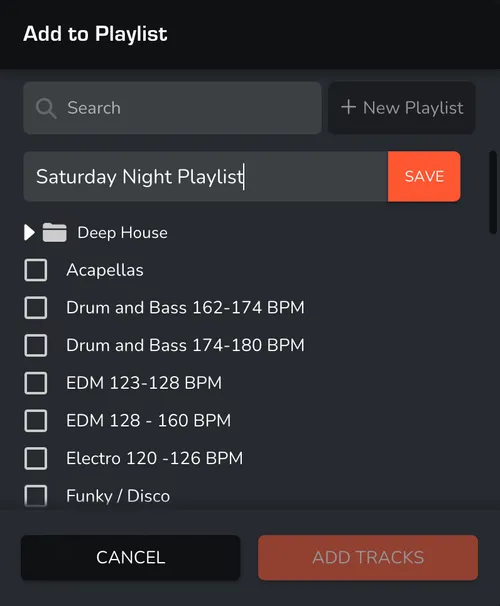
Done! Selected tracks from your MIXO library matching the streaming playlist are now organized into a new playlist.
