MIXO TO DJXML
1. Export DJXML playlists from MIXO
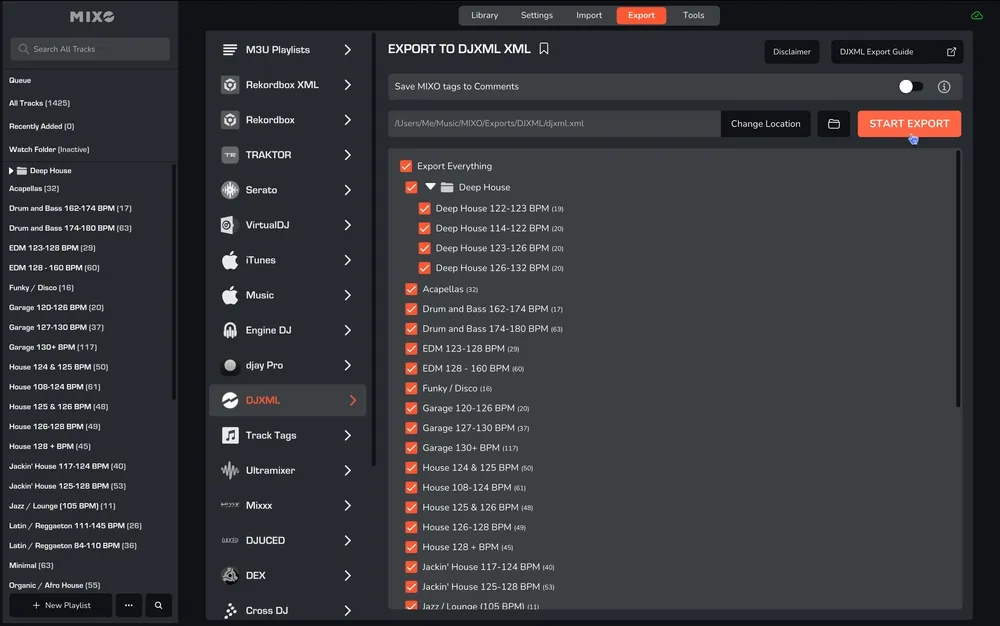
- In MIXO, navigate to the ‘EXPORT’ tab.
- On the left sidebar, select DJXML.
- Select whether to export your entire library or choose individual playlists and press the 'START EXPORT' button.
2. Locate DJXML File
- After the export, click the ‘OPEN EXPORT FOLDER’ button in MIXO.
- Alternatively, browse to the folder MUSIC -> MIXO -> EXPORTS -> DJXML.
Additional setting: You can enable ‘Save MIXO Tags To Comments’ to overwrite the comments field on each track with tags added in MIXO.